

How to Return Parwaaz Card Loan
How to Return Parwaaz Card Loan Paying back your Parwaaz Card loan is now easier than ever thanks to mobile banking apps. In 2026, most banks in Pakistan allow users to repay their Parwaaz Card dues directly from their phones. This system not only saves time but also ensures your account remains in good standing, your credit record stays positive, and you remain eligible for future benefits.
Many Parwaaz Card users worry about repayment deadlines or find loan repayment complicated. However, the process is simple once you know the steps. In this article, we will guide you through how to repay your Parwaaz Card loan via bank apps, explain why timely repayment is crucial, provide tips for safe payments, and answer common questions.
Why Timely Parwaaz Card Loan Repayment Is Important
Repaying your Parwaaz Card loan on time is essential for maintaining a healthy financial profile. Timely payments not only prevent extra charges but also help you continue enjoying the benefits of your Parwaaz Card without interruptions.
When you pay on schedule, you:
- Avoid late payment fees and additional service charges.
- Keep your account active and free from restrictions.
- Maintain a positive credit history, increasing your chances of higher future limits.
- Ensure eligibility for other Parwaaz Card benefits and government financial programs.
On the contrary, late or missed payments can lead to temporary blocking of your Parwaaz Card, recovery actions, or difficulties in obtaining new loans. Being disciplined with repayments is the easiest way to avoid financial stress and maintain trust with the service provider.
What You Need Before Using a Bank App
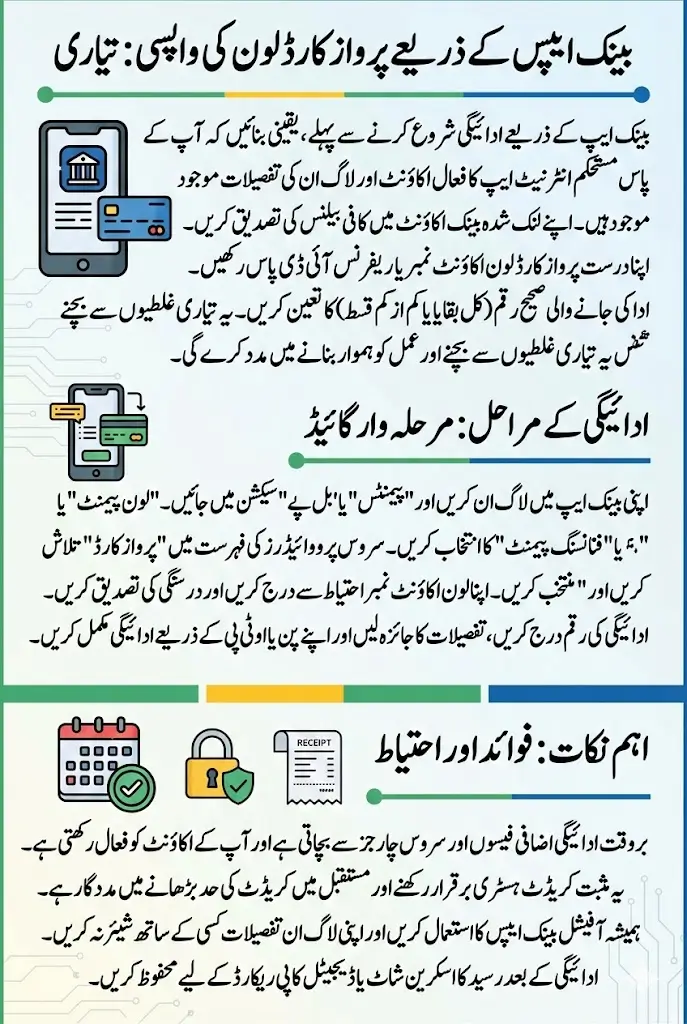
Before starting repayment through a bank mobile app, it’s important to have everything ready. Proper preparation avoids errors and ensures a smooth process.
To repay your loan, make sure you have:
- A smartphone with a stable internet connection.
- A registered bank app account on your preferred bank.
- Sufficient balance in your linked bank account.
- Your Parwaaz Card loan account number or reference ID.
- The correct repayment amount—either the full outstanding amount or the minimum installment.
Always confirm your outstanding balance before initiating a payment. This prevents issues like underpayment or overpayment, which may cause unnecessary follow-ups or delays in updating your account.
Step-By-Step Guide to Pay via Bank Mobile Apps
Repaying through bank apps is convenient and secure if you follow the steps carefully. Most banks have similar procedures, making it easy for users across Pakistan.
Logging Into Your Bank App
Open your official bank app and log in using your credentials. Banks provide secure login options such as PINs, passwords, or biometric authentication. Ensure your app is updated to the latest version to avoid errors or technical issues.
Navigating to the Loan Payment Section
After logging in, locate the Payments or Bill Pay section. From there, select Loan Payment or Financing Payment, depending on your bank’s interface.
Selecting Parwaaz Card as Service Provider
Use the search feature to find Parwaaz Card in the list of supported loan providers. Double-check that the correct provider is selected to avoid sending money to the wrong account.
Entering Loan Details
Enter your Parwaaz Card account number or reference ID carefully. This step is crucial to ensure your payment is credited correctly. Mistyped numbers can cause delays or misallocation of funds.
Inputting Payment Amount
Type in the repayment amount. You can pay the full outstanding balance or the minimum monthly installment, depending on your financial situation. Verify the amount before confirming the payment to avoid mistakes.
Confirming and Completing Payment
Review all entered details, then confirm the payment. Authenticate using your app’s security method, such as PIN, fingerprint, or OTP. After the transaction, save or screenshot the payment receipt for your records.
| Step | Action | Important Tip |
|---|---|---|
| 1 | Log in to bank app | Use the official app only |
| 2 | Go to Payments | Ensure strong internet connection |
| 3 | Select Parwaaz Card | Double-check the service provider |
| 4 | Enter loan details | Verify reference number carefully |
| 5 | Input payment amount | Check exact outstanding balance |
| 6 | Confirm payment | Save digital receipt for proof |
Most payments reflect within a few hours, though in some cases it may take up to one working day. Always check your Parwaaz Card account after completing the payment.
Can You Make Partial Payments?
Yes, many banks allow partial repayments of Parwaaz Card loans. Partial payments help reduce your outstanding balance while keeping your account in good standing.
Key points about partial payments:
- Always pay at least the minimum due to avoid late fees.
- Partial payments may still include small service charges.
- Full repayment is recommended to completely close your loan cycle.
Checking your Parwaaz Card app or loan notifications will help you confirm whether partial payments are permitted for your account.
Common Problems Users Face With Bank App Payments
Even with modern apps, users sometimes face issues. Here’s how to handle common problems:
- Payment Failed
- Check your internet connection.
- Ensure your account balance is sufficient.
- Retry after a few minutes.
- Payment Not Updated
- Wait a few hours for processing.
- Check transaction history in the app.
- Contact Parwaaz Card support if the payment is not reflected within 24 hours.
- Wrong Reference Number Entered
- Always double-check your loan account number before confirming.
- If payment goes to the wrong account, contact your bank support immediately.
Following these tips ensures your repayment process remains smooth and avoids unnecessary stress.
Tips for Safe and Smooth Repayment
Using bank apps for loan repayment is convenient, but safety is important. Follow these tips to make your payment secure:
- Always use official bank apps; avoid third-party services.
- Do not share your PIN, password, or OTP with anyone.
- Save transaction receipts until your payment reflects in the Parwaaz Card account.
- Pay your loan before the due date to avoid penalties.
- Check your exact outstanding balance before making payment.
How to Check Loan Balance Before Payment
Knowing your Parwaaz Card loan balance ensures accurate payments. You can check your balance through:
- Parwaaz Card official app or portal.
- SMS or notification alerts from Parwaaz Card.
- Customer support helpline.
Confirming the amount before repayment prevents errors and helps you plan your finances better.
Frequently Asked Questions
Are there extra charges for using bank apps?
Banks may charge a small service fee, which is usually displayed before confirming payment.
Can I pay at night or on holidays?
Yes, bank apps allow 24/7 payments, including nights and holidays.
How long does it take for payments to reflect?
Most payments update within a few hours, but sometimes may take up to one working day.
What if my bank account balance is low?
You can top up your account via bank transfer, nearby branch, or ATM before making the repayment.
Final Words
Paying your Parwaaz Card loan via bank apps in 2026 is one of the easiest and safest methods available. By preparing in advance, following step-by-step instructions, and keeping proper records, you can maintain a positive loan history and enjoy uninterrupted access to Parwaaz Card benefits.
Timely repayment builds trust, strengthens your financial profile, and opens doors for future financial opportunities. If any issues arise, always contact official bank or Parwaaz Card support rather than relying on unofficial sources.
Parwaz Card Apply Online For Loan And Jobs Abroad Full Details Step By Step 2026