

Parwaaz PSDF Portal Create Account
Parwaaz PSDF Portal Create Account by Punjab Skills Development Fund (PSDF) has become one of the most popular skill development initiatives in Punjab. Every year, thousands of young people apply to improve their skills and enhance their job prospects. However, before applying for any Parwaaz course, creating an account on the Parwaaz PSDF Portal is the most crucial step. Without an account, you cannot register for courses, track your application, or receive important updates.
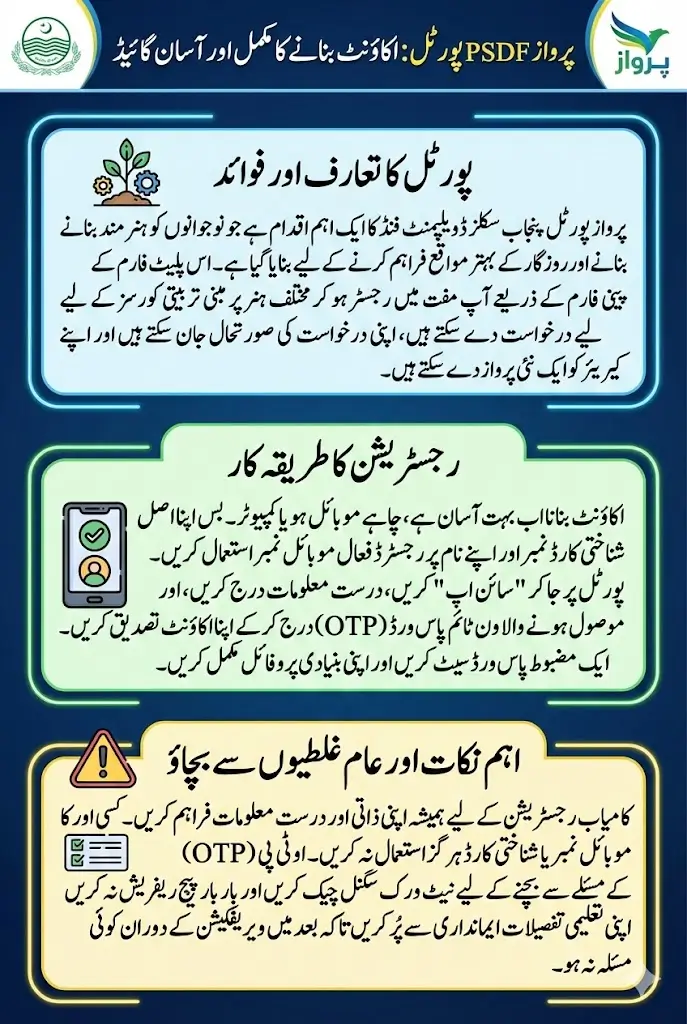
Many first-time applicants get confused during registration, especially when using a mobile phone. Some face OTP issues, while others mistakenly enter wrong information and face rejection later. In this guide, we will explain how to create a Parwaaz PSDF account step by step, whether you are using a mobile phone or a PC, and provide useful tips to avoid common mistakes.
You Can Also Read: Parwaaz Card Applicant Feature Launched: Complete
What Is Parwaaz PSDF Portal
The Parwaaz PSDF Portal is an official online platform launched by the Punjab Skills Development Fund to help youth access skill development programs. It allows students, job seekers, and young professionals to register for Parwaaz courses, track applications, and manage their profiles.
The portal is designed to make the registration and application process simple and transparent. Through this platform, users can:
- Create a personal account using CNIC or B-Form
- Apply for skill-based training programs
- Track application status and course progress
- Receive updates and notifications directly on their mobile
- Manage personal, educational, and contact details
Without an account, applicants cannot apply for courses, which makes registration the very first and most important step.
You Can Also Read: Parwaaz Card 2026 vs Hunarmand Naujawan Scheme
Who Can Create an Account on Parwaaz Portal
Before starting registration, it is important to check whether you meet the basic eligibility criteria. Only eligible candidates can submit applications.
To be eligible, you must:
- Have a valid CNIC or B-Form
- Be a permanent resident of Punjab
- Be aged between 16 and 35 years
- Meet the educational requirements for the selected course
- Have an active mobile number linked to your CNIC
Even if you meet these requirements, it does not guarantee selection. It only allows you to apply and proceed with the registration process.
You Can Also Read: Punjab Parwaaz Card Eligibility 2026 – Government Announces
Documents and Information Required
Before starting the registration process, gather the following documents and information:
- CNIC or B-Form number
- Active mobile number linked to CNIC
- Personal email address
- Educational records
- District and tehsil details
Using accurate and matching information is essential. Any mismatch in your CNIC, mobile number, or personal details can result in verification issues or rejection of your application later.
You Can Also Read: Parwaaz Card Status Check Active
How to Create a Parwaaz PSDF Account Using Mobile
Creating a Parwaaz account on a mobile phone is straightforward if done carefully. Here is the complete step-by-step process:
- Open the Official Portal
Open Chrome or any updated mobile browser and visit the official Parwaaz PSDF Portal. Make sure you have a stable internet connection to avoid interruptions. - Tap on Sign Up or Register
On the homepage, find and tap the Sign Up or Register button to begin creating your account. - Enter CNIC or B-Form Number
Carefully enter your CNIC or B-Form number without any dashes. Double-check it before moving to the next step. This will serve as your primary identification in the system. - Provide Mobile Number
Enter your personal mobile number registered on your CNIC. This number will receive a One-Time Password (OTP) for verification. Avoid using someone else’s number. - OTP Verification
An OTP will be sent to your mobile. Enter it within the given time. If the OTP does not arrive, wait a few minutes and resend. Avoid refreshing the page repeatedly. - Create Password
Create a strong password with at least 8 characters, combining letters and numbers. Avoid simple sequences like 123456. - Complete Basic Profile
Fill in your personal details exactly as per your CNIC, including:- Full name
- Date of birth
- Gender
- District and city
- Account Created Successfully
After submitting all details, your Parwaaz PSDF account will be ready to use. You can now log in anytime with your CNIC and password.
Tips for Mobile Registration:
- Use your own CNIC and mobile number
- Fill all fields correctly to avoid rejection
- Save your login credentials safely
You Can Also Read: Punjab Electric Bus Scheme Expands to All Districts
How to Create a Parwaaz PSDF Account Using PC
For many users, creating an account on a PC or laptop is easier because it reduces typing errors and is more convenient for uploading details. Here’s the step-by-step process:
- Open the official Parwaaz PSDF Portal in Chrome, Edge, or any updated browser.
- Click on Register or Create Account from the main menu.
- Enter your CNIC without dashes and provide your personal mobile number.
- Verify your account using the OTP sent to your mobile.
- Set a strong password and log in.
- Complete your profile by entering education and personal details.
Why PC Registration Can Be Easier:
- Larger screen for easier form filling
- Less chance of typing errors
- Convenient for reviewing details before submission
Common Registration Issues and How to Solve Them
Many applicants face problems during registration. Here are the most common ones and how to fix them:
| Problem | Possible Reason | Solution |
|---|---|---|
| OTP Not Received | Mobile number not linked to CNIC, network issues | Wait a few minutes, resend OTP |
| CNIC Already Registered | Account already exists on your CNIC | Use “Forgot Password” option |
| Invalid Information | Wrong CNIC format, missing fields | Recheck all details carefully before submission |
Other tips:
- Avoid multiple registrations
- Enter information exactly as per official documents
- Complete all required fields
Important Tips for Successful Registration
To increase the chances of smooth registration, follow these tips:
- Always use your own CNIC and mobile number
- Enter your educational information honestly
- Complete your profile fully before applying for courses
- Avoid submitting multiple accounts
- Keep your login credentials safe
Following these steps ensures that your application process is smooth and reduces the risk of rejection or verification issues.
What to Do After Creating Your Account
After successfully creating your account, you can start exploring the courses available on the portal.
- Check the eligibility requirements for each course before applying
- Apply only to courses that match your skills and education
- Regularly check notifications on the portal for updates on your application
- Keep your profile updated to avoid delays during verification
Remember: Selection for Parwaaz courses depends on merit, course demand, and verification by PSDF.
Is Account Creation Free?
Yes, creating an account on the Parwaaz PSDF Portal is completely free. There is no registration fee. Any person or website asking for money for registration is not official and should be avoided.
Conclusion
Creating an account on the Parwaaz PSDF Portal is the first step towards skill development and better career opportunities. Whether you register using a mobile phone or a PC, the process is straightforward if done correctly.
Always ensure that you use accurate personal information, verify your mobile number properly, and complete your profile fully. This will help avoid delays or rejection during course application and verification.
The Parwaaz Program is a valuable opportunity for the youth of Punjab. Register correctly, stay updated, and make the most of this skill development initiative to secure better career prospects.
Table for Quick Comparison: Mobile vs PC Registration
| Feature | Mobile Registration | PC Registration |
|---|---|---|
| Ease of Use | Medium, smaller screen | Easier, larger screen |
| OTP Verification | Same for both | Same for both |
| Profile Completion | Can be slower | Faster, easier review |
| Mistake Risk | Higher | Lower |
| Internet Requirement | Stable mobile connection | Stable broadband or Wi-Fi |