
NADRA Pak ID App Adds
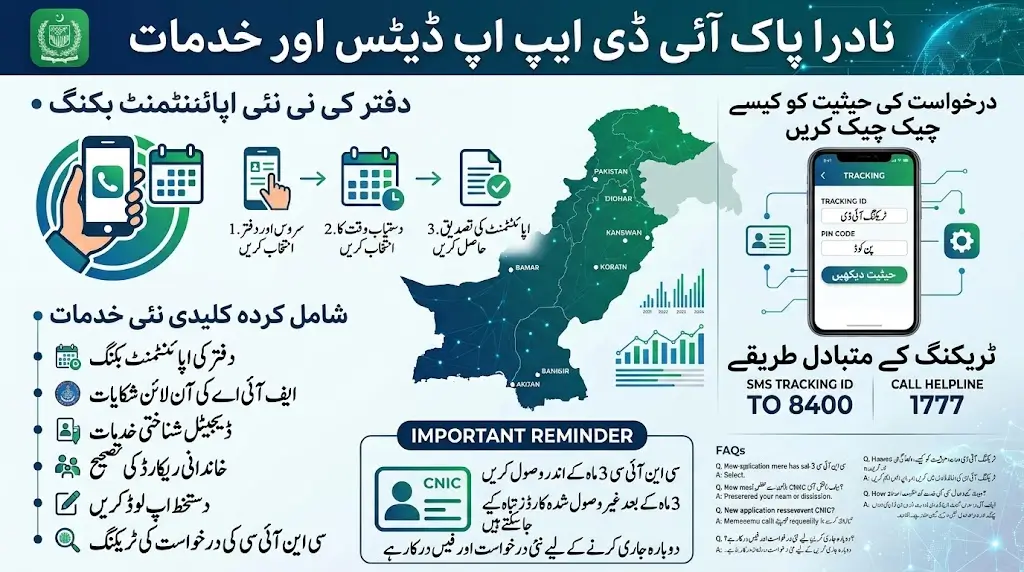
The National Database and Registration Authority (NADRA) has introduced a new appointment booking facility through its Pak ID mobile app, giving citizens a more convenient way to visit NADRA offices.
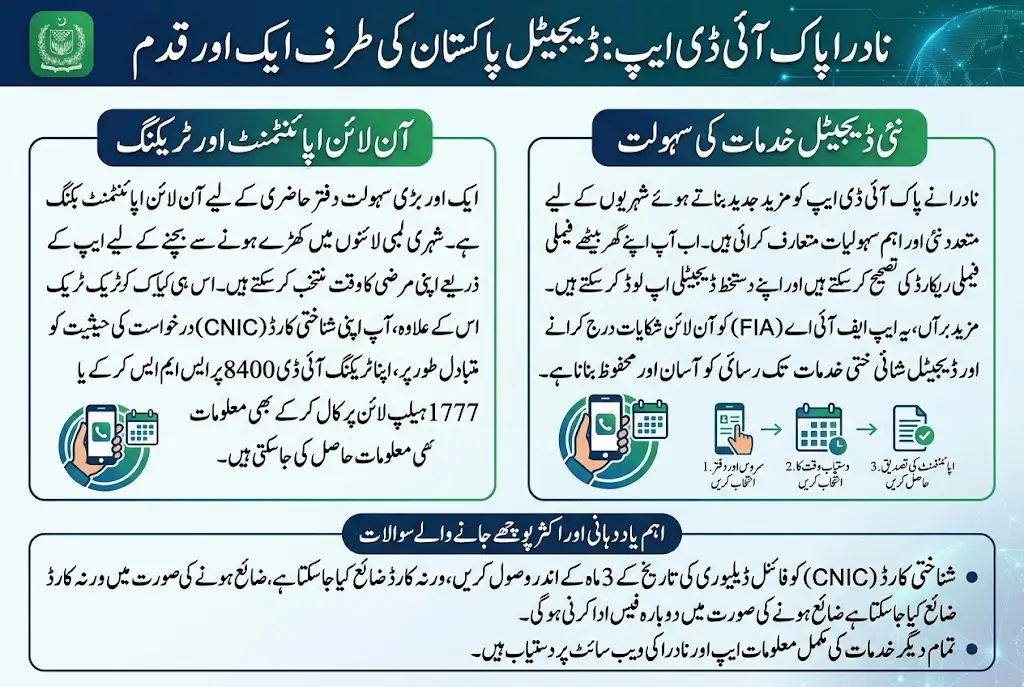
With the new option, applicants can book an appointment from their homes instead of waiting in long queues at NADRA offices. After selecting an available slot, citizens can visit the relevant office at their scheduled time.
The latest update to the Pak ID app also brings several other services designed to reduce the need for in-person visits and make identity-related services easier to access.
New Services Added to the Pak ID App
According to NADRA, the updated application includes several new features for citizens.
These include:
- Appointment booking for NADRA office visits
- Online complaints to the Federal Investigation Agency (FIA)
- Digital identity-related services
- Family record correction
- Signature upload facility
- CNIC application tracking
The new features are aimed at giving citizens greater access to NADRA-related services through their mobile phones.
How to Book a NADRA Appointment Through Pak ID
Citizens who need to visit a NADRA office can use the appointment facility available in the updated Pak ID mobile application.
The basic process is to log in to the app, select the relevant appointment option and choose an available time slot. Once the appointment is booked, the applicant can visit the designated NADRA office at the scheduled time.
This can help applicants plan their visit and potentially reduce the amount of time spent waiting at the office.
How to Check NADRA CNIC Application Status
The Pak ID app also allows citizens to track the progress of their identity card application from home.
To check an application through the app, applicants need to:
- Log in to the Pak ID mobile app.
- Open the application tracking option.
- Enter the Tracking ID provided on the receipt.
- Enter the required PIN code.
- View the current application status.
NADRA has also provided alternative methods for applicants who want to check their application status.
Citizens can send their Tracking ID to 8400 through SMS or call the NADRA helpline at 1777.
NADRA Introduces More Digital Options
The latest Pak ID update reflects NADRA’s continued move toward digital services. Instead of relying entirely on physical visits, citizens can now access a growing number of identity-related facilities through the mobile application.
Features such as digital identity services, family record corrections and signature uploads can make certain processes more convenient for applicants.
The appointment system is particularly useful for people who still need to visit a NADRA office for services that cannot be completed entirely online.
Important Reminder About Collecting Your CNIC
NADRA has also reminded citizens to collect their identity cards within the specified period after issuance.
Under the stated policy, an identity card that remains uncollected for three months after the final delivery date may be destroyed.
If the card is destroyed because it was not collected within the required period, the applicant must submit a new application and pay the applicable fee again to obtain another identity card.
Citizens should therefore keep track of their application and delivery status and collect their identity card on time.
What Citizens Should Know
The latest Pak ID app update brings several services together in one platform. Citizens can use the application for digital identity-related facilities, track their CNIC applications and, where required, arrange an appointment before visiting a NADRA office.
Those who already have a pending identity card application can use the available tracking options instead of repeatedly visiting a NADRA office to ask about its status.
The new appointment facility can also make office visits more organized by allowing applicants to select a scheduled time before travelling to the NADRA office.
Frequently Asked Questions
Can I book a NADRA office appointment through the Pak ID app?
Yes. NADRA has introduced an appointment booking facility through the Pak ID mobile app, allowing citizens to schedule a visit to a NADRA office.
How can I track my NADRA CNIC application?
You can track your application through the Pak ID app by entering your Tracking ID and PIN code. NADRA also allows applicants to send the Tracking ID to 8400 via SMS or call 1777.
What happens if I do not collect my CNIC on time?
According to the stated policy, an identity card that is not collected within three months after the final delivery date may be destroyed. The applicant may then need to submit a fresh application and pay the applicable fee again.
What other features are available in the updated Pak ID app?
The updated app includes features such as appointment booking, digital identity services, family record correction, signature upload and online complaints to the FIA.
Read Article Link Here: NADRA Juvenile Card Apply Procedure 2026 – Fee, Requirements and Delivery Time for Children Under 18